
- Log in to the Lexplore portal at portal.lexplore.com.
- Navigate down to the student and then select the relevant assessment for which you wish to add a comment.
- Select “Add comment”.
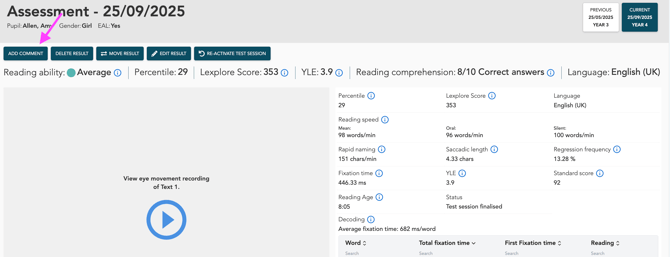
- A pop-up window will then appear with two options: “Internal comment” and “Comment”.
- “Internal comment” is only visible to examiners and other roles authorised to asess. Select this option if you wish to write something for your own reference that may affect the result, or a message for Lexplore. All examiners can see what you have written. Do not include any personal details about the student. Click “Save”. See the example below showing where the comment appears.
- “Comments” can be viewed by anyone who is logged in. Here, you can select one or more of the pre-written comments. Click “Save”.
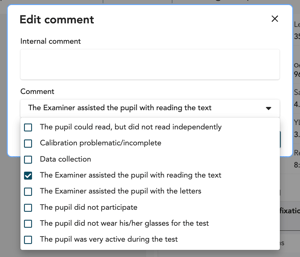
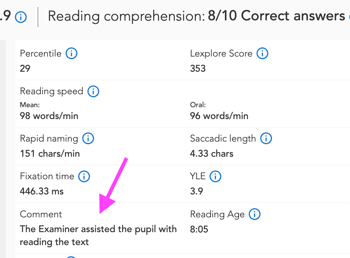
As you can see in the example images above, internal comments and standard comments appear in the same place in the results pane.
Comments and what they mean:
-
‘The examiner helped the student while they were reading the text’
Watch and listen to the recordings to determine how much help the student received. If the examiner helped the student read most of the text, this will affect the result and the result is not valid. In this case, the student should be marked as ‘Not reading yet’.
-
‘The student did not have their glasses during the assessment’
If a student needs glasses to read, we recommend that they wear them. If they did not have their glasses during the assessment, we recommend retesting when they are wearing them.
-
‘The student did not participate (only available via the results portal)’
If the student was not at school at the time of the assessment due to illness or other absence, we recommend marking them as not having participated.
-
‘The student was very active’
A highly active student may affect the result. We recommend that the examiner uses this comment so that colleagues are aware that activity may have affected the result.
-
‘Calibration difficult/incomplete’
If the examiner was unable to achieve satisfactory calibration after several attempts, this comment is required. For various reasons, not all students can be calibrated. They can still complete the assessment, but poor or incomplete calibration may affect the recording quality and reading patterns.
-
‘The examiner helped with pronouncing the letters’
This can be helpful for RAN, as students may need support. This is a useful comment for colleagues reviewing the data, as further intervention may be required.
These comments, which have already been drafted for various scenarios, can also be added for the student immediately after the test within the test application
🛎️ Please feel free to vote below on whether this article helped you with your query on this topic or not. We at Lexplore want to make these guides as useful as possible for you and really appreciate your feedback😊