

Welcome to the training course for those who want to learn how to screen students 😊
The aim of this training course is that, upon completion, you will be able to:
- plan for assessment
- have knowledge of the conditions for conducting a good assessment
- know what steps are involved in assess
Course structure
This course is the first part of the assessment training programme and covers what you need to plan for assess.
There are then two different assessment training programmes; choose the one your school/organisation has selected:
- Assessment with an eye tracker
- Assessment with a webcam
In Lexplore's terminology, assess is the first step – establishing a baseline from which to proceed.
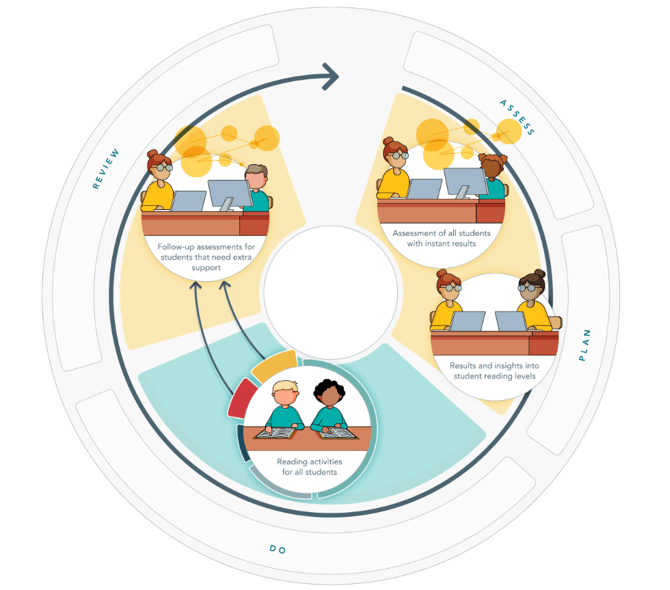
Course content:The examiner role
- Informing guardians, colleagues and students
- Planning and schedule
- The room
- Criteria for reliable results
- The 5 steps of assessment
- Support - More help

The examiner role
By carefully following the established guidelines and ensuring high quality in recording
students’ eye movements, you contribute to reliable and accurate results that form the
foundation of each student’s reading journey.
Key roles in the use of Lexplore at school
- Ambassador Leads and drives the implementation of Lexplore within the school, supporting colleagues and coordinating the work.
- Headteacher
Provides the framework and necessary conditions to enable a successful implementation and integration of Lexplore into the school’s systematic reading development. - All teachers
Engage with the insights gained from the assessment, and actively support each student’s reading development through explicit reading instruction, skills practice, and integration of results into everyday teaching.

Informing guardians, colleagues, and students
- Guardians
You can find suggested communication templates for guardians in the Lexplore Knowledge Base. - Colleagues
We recommend showing the video that demonstrates how an assessment is carried out. Even better - let colleagues try it themselves in the staff room to gain hands-on experience and become familiar with the process. - Students
Encourage teachers to show the explanatory video (available in the Lexplore Knowledge Base) to help students understand what happens during an assessment. We recommend not telling students that they will be tested, but instead explaining that it is a reading activity and that this is an opportunity for you to support the student in the best way possible.
🔗 Video to show students before being assessed with an eye tracker
🔗 Video to show students before being assessed with the webcam
Planning and schedule
- Make a schedule for each class or year group in the school that is to be assessed.
- Allow approximately 5-7 minutes per student.
- It is easiest to choose lessons when the whole class is in the classroom, as this makes it easier for them to gather together.
- Share this with all teachers at the school, unless it is the respective teachers who are assessing their classes. It is necessary for teachers to be able to plan their lessons and for students to know when assessment will take place.
- Include Lexplore's assessment periods as part of the term's work.
- Book a room for the assessment.
- It is a good idea to always have a chair outside the room where you are testing. That way, you always have the next pupil waiting outside, ready to be tested. This creates a rotating system that saves a lot of time.
The room
- You will need a table that is large enough for both you and the student to sit comfortably during the test.
- The student will need a chair with good back support and legs without wheels, but preferably with a footrest.
- If possible, choose a room that is close to the classroom where the students will be.
- Try to find a room where you will not be disturbed. This will help the students
concentrate while reading. - If the room has windows that may be distracting for the student, try to seat them away from the windows so that they can concentrate on their reading.
- Ideally, the room should have blinds or curtains that can be drawn to prevent direct sunlight.
- Use good lighting – make sure the student's face is well lit.
- You will also need power sockets for your equipment, perhaps an extension cord, and a good Wi-Fi connection.

Criteria for reliable results
In order for the test results to be reliable, the following conditions must be met:
- Students are tested individually in a calm and quiet environment. For example, two students are not tested simultaneously in different parts of the room.
- The student must be comfortable with all observers during the test. Students may watch other students being screened as long as they are not watching someone of the same age or grade as themselves. The student being observed must have given their consent and feel comfortable with spectators.
- The student receives correct instructions and the examiner ensures that the student understands them.
- The examiner follows the testing guidelines and assists the students according to the test guidelines.
The 5 steps of assessment

- Positioning - the student should sit correctly and comfortably and remain reasonably still
- Calibration - by the camera that reads the student's eye movements
- RAN - the student says aloud what the letters are called
- Text 1 samt frågor - the student reads aloud and then answers a number of comprehension questions
- Text 2 and questions - the student reads silently, except for second-year students, who also read this text aloud and then answer reading comprehension questions
1. Positioning
Positioning the student correctly is one of the most important parts of the entire test and is crucial for achieving good recording quality.- The distance between the student and the screen needs to be set according to the instructions in the programme.
- The back must rest straight against the backrest of the chair, the feet should be placed on the floor or footrest, and the arms should rest on the table.

2. Calibration
- Check that the equipment and the student are still in the correct position.
- The student is instructed to start calibration and to follow the circle on the screen. Inform the student to focus on the circle at all times; when the circle is moving and especially when it is still.
- Click on ‘Start calibration’.
- Calibration ends automatically.
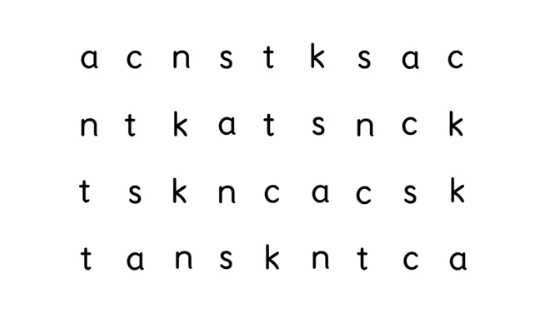
3. RAN
- The student should name a series of letters.
- It does not matter if the students say the name of the letter or the sound; a mixture of both is also acceptable.
- It does not matter if the students say the wrong letters.
- Only help if the student does not recognise the letter and cannot continue. If this happens, wait 5 seconds before helping.
- The RAN results are not included in the final analysis of each student's reading ability, but provide a value for the number of letters per minute.
- The RAN test is timed, so the student must not be disturbed while it is in progress.
- If a student has a low RAN score, a mark will be displayed afterwards.
4 & 5. The texts
- Lexplore currently has eight different texts at the same level of difficulty per year group, to avoid students having to read the same text twice.
- In Year 2, there are 16 different texts, eight easier ones in the autumn and eight slightly more difficult ones in the spring.
- Let the students read at their own pace.
- The students read two texts, the first aloud and the second silently. Except in Year 2, when both texts are read aloud.
- Keep interaction with the students to a minimum while they are reading; do not look at them.
- If the student gets stuck on a word, wait 5 seconds and then say the whole word to the student.
- Click “Next” or press the space bar on the keyboard as soon as the student has finished reading the last word. This stops the recording of the student’s eye movements, but the sound continues to be recorded.
🔗 Would you like to know more about the background to the texts used in the assessment?
4 & 5. Reading comprehension questions
- The examiner must not assist with the questions.
- When the student has answered, respond with ‘thank you’ or ‘okay’.
- The student should not be informed whether their answers are correct or incorrect.
- Avoid rephrasing questions.
- All grammatical forms of the correct answers are accepted.
- Synonyms are accepted, e.g. “sick” instead of “cold”.
- If the student says more, and at the same time answers subsequent questions, mark these as correct and ask the question anyway.
- Did the student read independently?
- If not, can the student read at all?
- Would you like to continue or stop the assessment?
Support - More help
You are always welcome to search for answers to your questions yourself or contact Lexplore Support
You can always search for your answer in the Knowledge base.
Well done!⭐
You have now completed this sub-course.
There are now two different assessment training programmes available. Select the one chosen by your school/organisation:
- Assessment with an eye tracker
- Assessment with a webcam
Click on the button below to indicate that you have completed the course.