
Once your students have access to Lexplore Reading App, you as a teacher can modify how they are able to use the app. All of this is controlled from the Admin page for your class in the Lexplore portal.
Once you have clicked into a class in the Lexplore portal, click the cog wheel in the top right corner to go to the admin page.
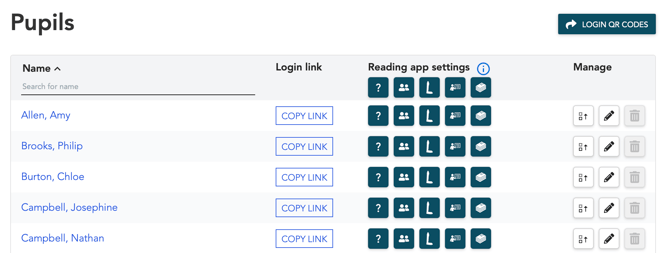
You can modify the following features in the student's Reading App:
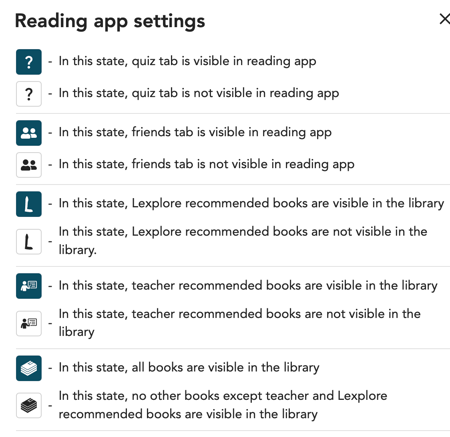
 Hide/Show the Quiz tab in the student's Reading App
 Hide/Show the Reading Friends tab
 Hide/Show Lexplore recommendations in the reading app for the whole class
 Hide/Show teacher recommendations in the reading app for the whole class
 Hide/Show other books in the reading app for the whole class
To remove or add a feature for the whole class, click the icon at the top of the header row.
You can also choose to hide/show each feature for individual students.
🛎️ Please vote below on whether this article helped you with your question. We at Lexplore want to make these guides as good as possible for you and really appreciate your feedback😊