- Remove multiple book recommendations – teachers can now remove several book recommendations at once
- Reading App: Remove a book from “My Reading” – students can remove books while keeping their earned points
👋 A quick hello
I’m Ida Jonsson, the new Head of Product at Lexplore! I’m excited to work on making our platform even more valuable for teachers and students. I’ll be sharing updates whenever we roll out new features and improvements to support you. Here’s what’s new this time!
Remove multiple book recommendations
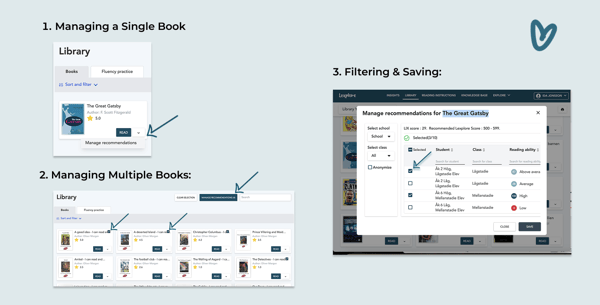
Teachers can now manage book recommendations in bulk. Whether updating recommendations for a single book or multiple books, the process is now faster and more flexible.
How it works
1. Managing a single book:
- Go to the Library.
- Click the arrow-down button next to the book.
- Select “Manage Recommendations”.
2. Managing multiple books:
- Go to the Library and select multiple books using the checkboxes.
- Click “Manage Recommendations”.
3. Filtering & saving:
- In the pop-up window, filter students by school, class or grade.
- Select or deselect students to adjust recommendations.
- Click “Save” to apply the changes.
Reading App: Remove a book from “My Reading”
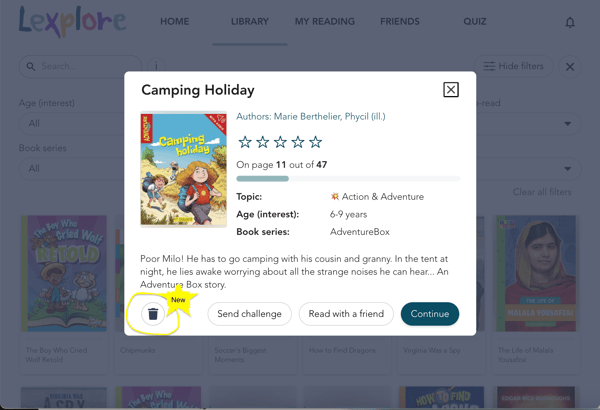
Students can now remove books from their “My Reading” list while keeping their earned points.
How it works
- Open a started book in the Reading App.
- Click the trash can button.
- Confirm the removal in the pop-up message.
- The book will no longer appear in “My Reading”, but any reading points earned will remain.
These updates make book management easier for teachers and give students more flexibility in their reading journey. Let us know what you think – we’d love your feedback! 🚀
💬 Have thoughts or questions?
Feel free to reach out - we’d love to hear from you.
📩 ida.jonsson@lexplore.com
Let’s keep improving together,
Ida Jonsson, Head of Product